Panda Typeface for Web Design
The Panda typeface brings a fresh, playful energy to digital projects. As a display font, it’s designed to stand out while maintaining clarity and charm. Its rounded forms and soft curves make it ideal for capturing attention without overwhelming the viewer.
For web designers and UI creators, Panda offers a unique way to elevate headers, banners, and promotional content. It works especially well in hero sections where a friendly yet professional tone is needed. Whether you're designing a landing page or a product showcase, Panda adds a touch of personality that can enhance user engagement.
Visual Characteristics and Style
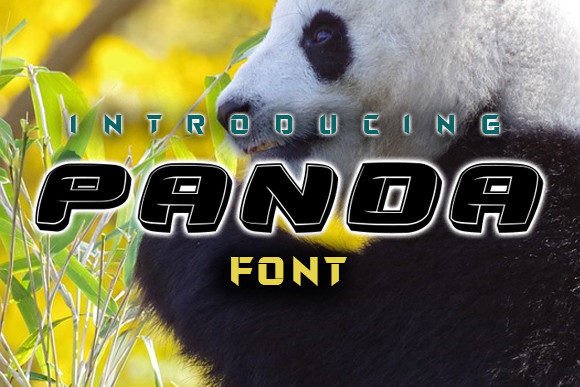
Panda has a distinct visual identity with its gentle curves and balanced proportions. The letterforms are designed to be both expressive and readable, making it suitable for a variety of design contexts. This font exudes warmth and approachability, which can help establish a strong emotional connection with your audience.
The rounded edges and open counters give Panda a modern, clean look that complements both minimalist and vibrant design aesthetics. Its versatility allows it to blend seamlessly with other fonts, making it an excellent choice for font pairing strategies in web design.
Applying Panda in Digital Projects
Using Panda on website headers ensures that your brand message is delivered with a sense of optimism and creativity. It’s particularly effective when used in call-to-action areas, where a friendly tone can encourage users to take action.
On online store banners, Panda can highlight promotions or featured products with a cheerful presence. For blog headers and article titles, it adds visual interest without distracting from the content itself. In course sales pages or coaching websites, Panda helps create a welcoming atmosphere that aligns with the brand's values.
When designing a creative portfolio site, Panda can be used for section headings and project titles, reinforcing a consistent brand voice throughout the layout. Its character makes it perfect for digital ads and social media graphics where first impressions matter most.
Readability and Usability
Despite being a display font, Panda maintains good readability across different screen sizes. When used for short phrases or headlines, it ensures that the text is easy to scan and understand. However, it’s not recommended for long paragraphs due to its decorative nature.
For mobile screens, Panda performs well when paired with a complementary sans serif font for body copy. This combination ensures that the design remains legible and aesthetically pleasing on smaller devices. When using Panda on dark backgrounds, ensure sufficient contrast to maintain visibility.
Font Pairing and Brand Identity
Pairing Panda with a simple sans serif font like Helvetica or Arial enhances the overall design by balancing playfulness with professionalism. This approach is ideal for creating a cohesive visual hierarchy on landing pages and product listings.
In editorial design, combining Panda with a serif font can add depth and sophistication to digital publications or blog layouts. The key is to use Panda strategically for emphasis and let the supporting fonts handle the bulk of the content.
When building a brand kit, consider how Panda contributes to your brand’s tone and identity. A font like Panda can reinforce a brand’s personality, whether it’s youthful, innovative, or simply creative.
Practical Considerations for Web Use
Before implementing Panda on a live website, check if it includes necessary styles, weights, and multilingual support. Ensure that the font file format is compatible with your platform and that webfont availability is confirmed.
Commercial font licensing is essential for websites, client projects, and digital templates. Always verify the terms of use to avoid any legal issues when deploying Panda across multiple platforms or for public-facing content.
By integrating Panda into your design workflow, you gain access to a font that supports both aesthetic appeal and functional usability. It’s a valuable asset for any designer looking to enhance their digital creations with a touch of personality and charm.